Radix
Chart for a person, event, or anything
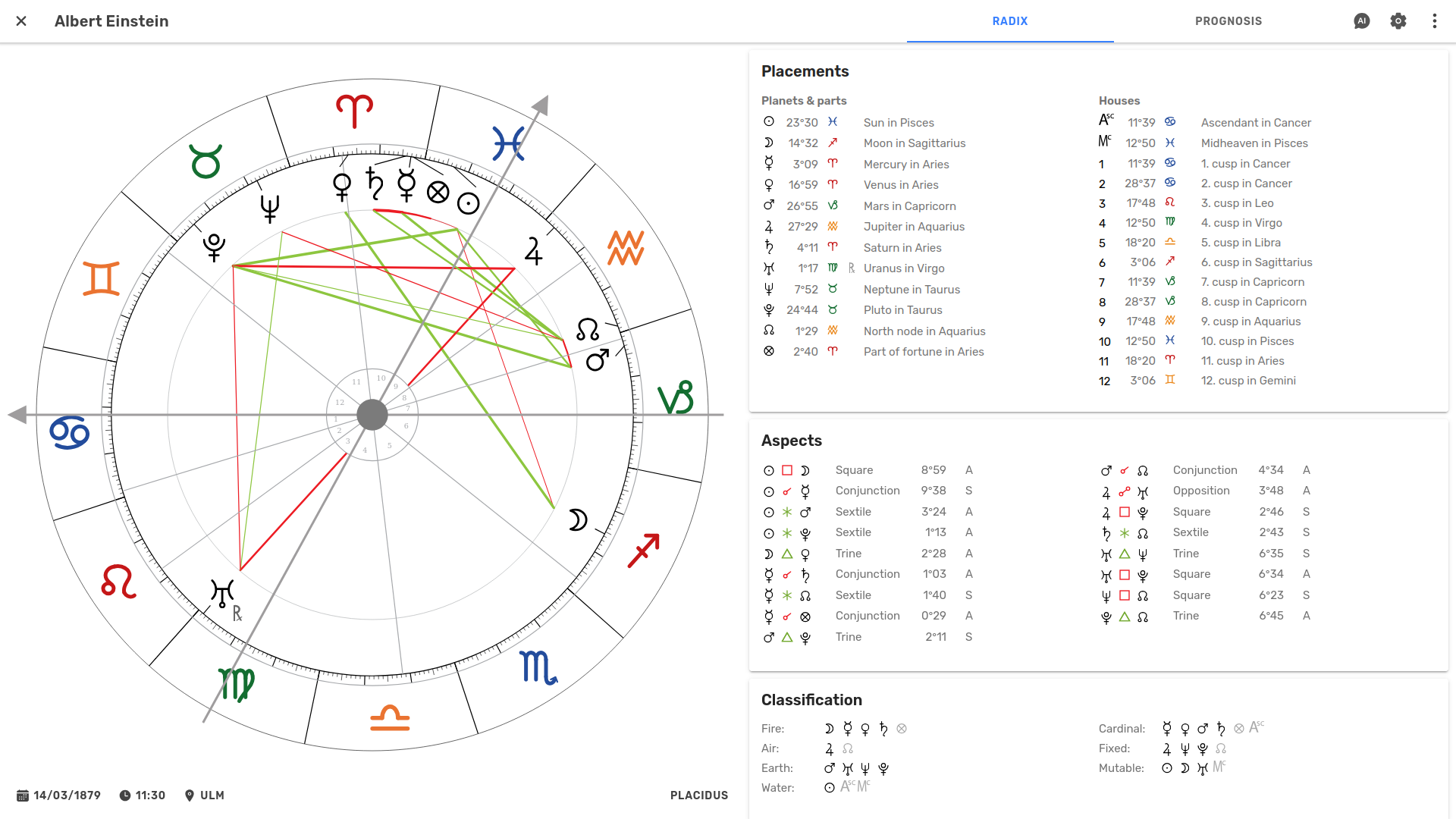
A radix is a chart for a person, event, organization, or anything else you want to explore. Astropilot calculates it to professional-grade precision and renders it with a carefully designed symbol set, keeping it clear and readable from phones to large screens.
From there, you can explore, interpret, customize, and work with the chart in detail.
Create
Everything you need to cast an accurate chart.
- Easy chart creation
Just enter a name, date, time and city – and the chart is ready.
- High-precision calculations
The chart calculation is based on state-of-the-art ephemeris software, so you can rely on its accuracy.
- Millions of locations
Enter a city and choose it from the suggestions. Astropilot takes care of the location data automatically.
- Time zones
Historical time zones and daylight saving rules are applied automatically.
Interpret
Everything you need to explore what the chart has to say.
- Planets, asteroids, points
Choose exactly which bodies and calculated points appear, from the classical set to asteroids, centaurs, dwarf planets, and much more.
- Highlight points
Hover or click points in the chart to highlight them and their aspects. Focus on specific parts of the chart and make patterns easier to see.
- Aspects
Major and minor aspects are listed and drawn in the wheel. Choose which aspects to show and which points can form aspects. Customize how aspect lines are displayed, including line thickness for orbs and dashed lines for separative aspects.
- Orbs
Orbs determine how close an aspect needs to be to count. Choose from several sensible defaults, or customize the orb for each aspect.
- House systems
Switch between the common house systems and see the chart redraw immediately.
- Aspect patterns
Grand trines, T-squares, yods and other configurations are detected and highlighted for you.
- Element & modality distribution
See at a glance how the chart is weighted across fire, earth, air and water, and across the three modalities.
- Chart pattern
The overall shape of the chart – bowl, bucket, splash and more – is identified automatically.
- Moon cycle
See the lunar phase at birth, with its designation and appearance.
Customize
Make the chart work the way you prefer.
- Easy access to settings
Access chart settings directly from the chart, without interrupting your workflow.
- Live updates
The chart updates immediately as you change your settings.
- Settings are remembered
Your settings are kept between sessions.
Print and download
Take your charts beyond Astropilot.
- Print or save as PDF
Print the chart and all lists directly, or save a clean PDF for sharing or other uses.
- Download charts
Download the chart drawing as a high-resolution image for social media, presentations, books, and more.
Organize
Keep your charts easy to find and manage.
- Chart overview
Scroll through all your charts in one place.
- Organize charts in lists
Create lists to keep charts organized and easy to find.
- Search
Quickly find any chart by name.
Explore with Live Player
Bring charts to life and explore them through time.
- Move through time
Smoothly move the slider forward and backward in time, with the chart following your movement precisely. Zoom the time scale in or out to explore the period at the level of detail you need.
- Fine-tune the birth time
Move the radix time to investigate and refine an uncertain birth time.
- Explore mundane astrology
Move the radix date to explore the chart in relation to events and periods.
- Play the chart
Press play and watch planetary movements unfold smoothly over time.
- Step through time
Move forward or backward in precise time units, from days and months to larger intervals.
- Step through aspects
Jump from one aspect to the next. Step through all aspects, or highlight specific planets to step through only their aspects.
- Set bookmarks
Mark interesting moments and jump between them as you explore.
Ask Astropilot AI
Get help exploring and interpreting the chart.
- AI assistance at hand
Astropilot AI is always close at hand, right alongside the chart you're exploring.
- Ask questions about the chart
Explore interpretations, investigate patterns, and deepen your understanding with AI assistance.
- Grounded in the chart
Astropilot AI works with the actual chart calculations, so you can ask questions about what you're looking at.
- 10 AI credits each month
Your subscription includes 10 AI credits to use each month – enough for around 10 medium-length conversations, or many more shorter questions and answers. Need more? You can purchase additional credits at any time.