Prognosis
Chart for a point in time
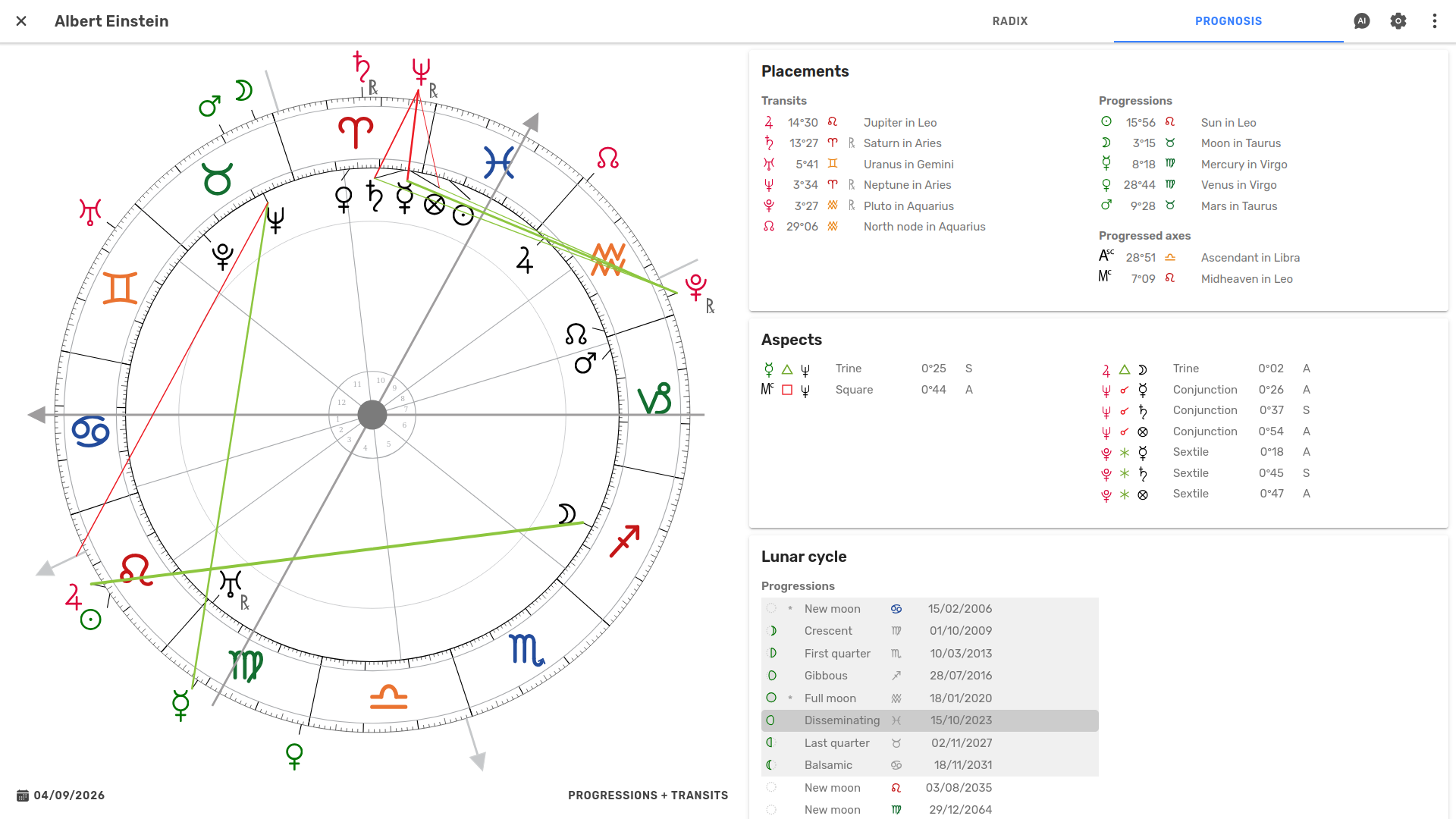
A prognosis chart combines a radix with planetary positions for a selected point in time. Astropilot places them together so you can see how the planetary positions relate to the natal chart.
Explore the prognosis interactively, and move through time with Live Player.
Create
Bring a point in time into focus.
- Easy access
The prognosis is just a tab away. Switch easily between the radix and prognosis without losing your place.
Interpret
Explore how planetary movements connect with the radix.
- Prognosis view
The planetary positions for the selected time are placed around the radix.
- Prognosis types
Switch between transits, progressions, tertiary and minor progressions, and solar arcs – all from the same chart. View one or two prognosis types at once, and switch between them with the chart updating live.
- Highlight points
Hover or click points in the chart to highlight them and their aspects to the radix. Focus on specific parts of the prognosis and make patterns easier to see.
- Aspects
See aspects between the current sky and natal positions, both in the chart and in a clear list.
- Orbs
Tighten or widen the orbs used for prognosis independently of your radix settings.
- Moon cycle
Follow the lunation cycle for both the transiting and progressed Moon. Browse the phases, see where you are in the cycle, and click a phase to jump to it.
Explore with Live Player
Move through time and watch the chart unfold.
- Move through time
Smoothly move the slider forward and backward in time, with the chart following your movement precisely. Zoom the time scale in or out, jump to a specific date and time with the calendar, or press Now to return to the present.
- Play the chart
Press play and watch planetary movements unfold smoothly over time.
- Step through time
Move forward or backward in precise time units, from days and months to larger intervals.
- Step through aspects
Jump from one aspect to the next. Step through all aspects, or highlight specific planets to step through only their aspects.
- Set bookmarks
Mark interesting moments and jump between them as you explore.
- On every device
Use Live Player on desktop, mobile, and tablet.
Ask Astropilot AI
Get help exploring the influences at play.
- AI assistance at hand
Astropilot AI is always close at hand, right alongside the prognosis you're exploring.
- Ask about the prognosis
Explore interpretations, investigate planetary influences, and deepen your understanding with AI assistance.
- Grounded in your prognosis
Astropilot AI works with the actual chart calculations, so you can ask questions about the prognosis you're looking at.
- 10 AI credits each month
Your subscription includes 10 AI credits to use each month – enough for around 10 medium-length conversations, or many more shorter questions and answers. Need more? You can purchase additional credits at any time.